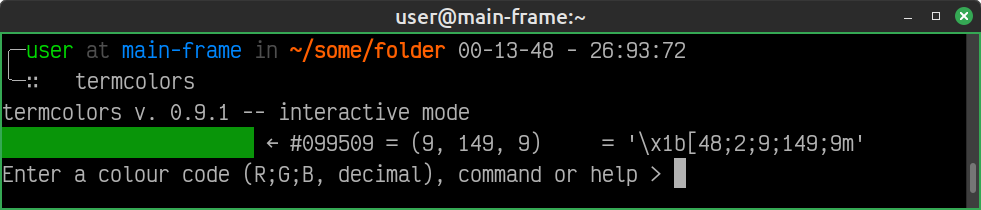
termcolorstermcolors is a small TUI (terminal user interface) utility for working with true-colour (24-bit) ANSI escape sequences in the terminal. It provides a simple way to generate foreground or background ANSI codes from RGB colour values.
pyperclip
pip install termcolors
Or install from source:
pip install -e .
    ╭─user at main-frame in ~/some/folder 00-13-48 - 26:93:72
    ╰─∷   termcolors
    termcolors v. 0.9.1 -- interactive mode
    Enter a colour code (R;G;B, decimal), command or help > 9;149;9
termcolors -f <file>
In the batch input mode any .ssv file with colours specified in the correct format2 is read. All the parsed colours, along with #hex and int triplets and with the corresponding ANSI codes, are printed to stdout after which the program quits.
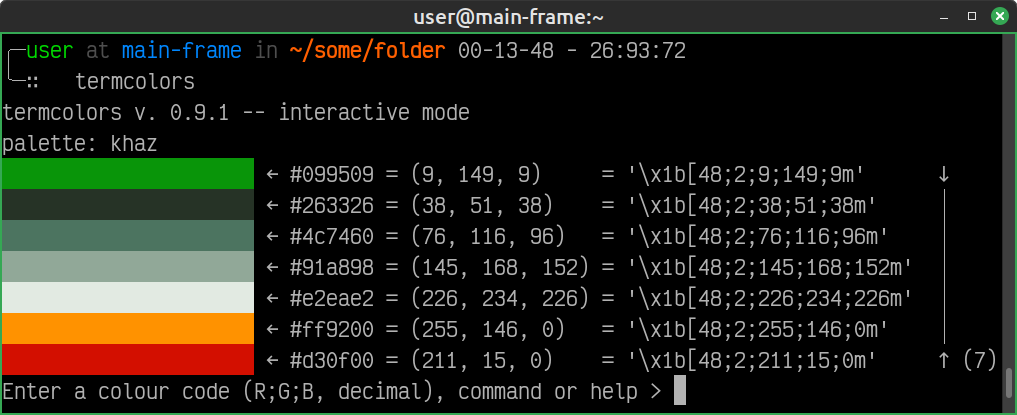
Typing palette in the interactive mode invokes the method. The user is presented with a menu of available palettes, corresponding to .ssv files stored in the assets folder. he palette is then generated and printed to stdout, after which the program quits.
    ╭─user at main-frame in ~/some/folder 00-13-48 - 26:93:72
    ╰─∷   termcolors
    termcolors v. 0.9.1 -- interactive mode
    Enter a colour code (R;G;B, decimal), command or help > palette
    'ansi16' | 'forest_vibes' | 'gruvbox' | 'khaz' | 'material_basic'
    'navy_light_blue' | 'nord' | 'simple' | 'solarized' | 'turquoise_depths'
    Enter a palette name> khaz
Input semi-colon separated triplets might be in any of the following forms:
Invalid input values or formats will result in an error.
MIT
File with the first line in the form
# palette: <name>; filename: <filenamename>.ssv
the palette will show in the menu as a
<name> option.↩
See Input format ↩